> ## Documentation Index
> Fetch the complete documentation index at: https://getappfox.com/subscription/docs/llms.txt
> Use this file to discover all available pages before exploring further.
# Authentication
> Create an Appfox API key in the Shopify admin and send it as a bearer token. Each key starts with afx_live_ and must stay on your own server.
The Appfox API uses bearer token authentication. Each key is scoped to the Shopify shop that created it.
## Generate an API key
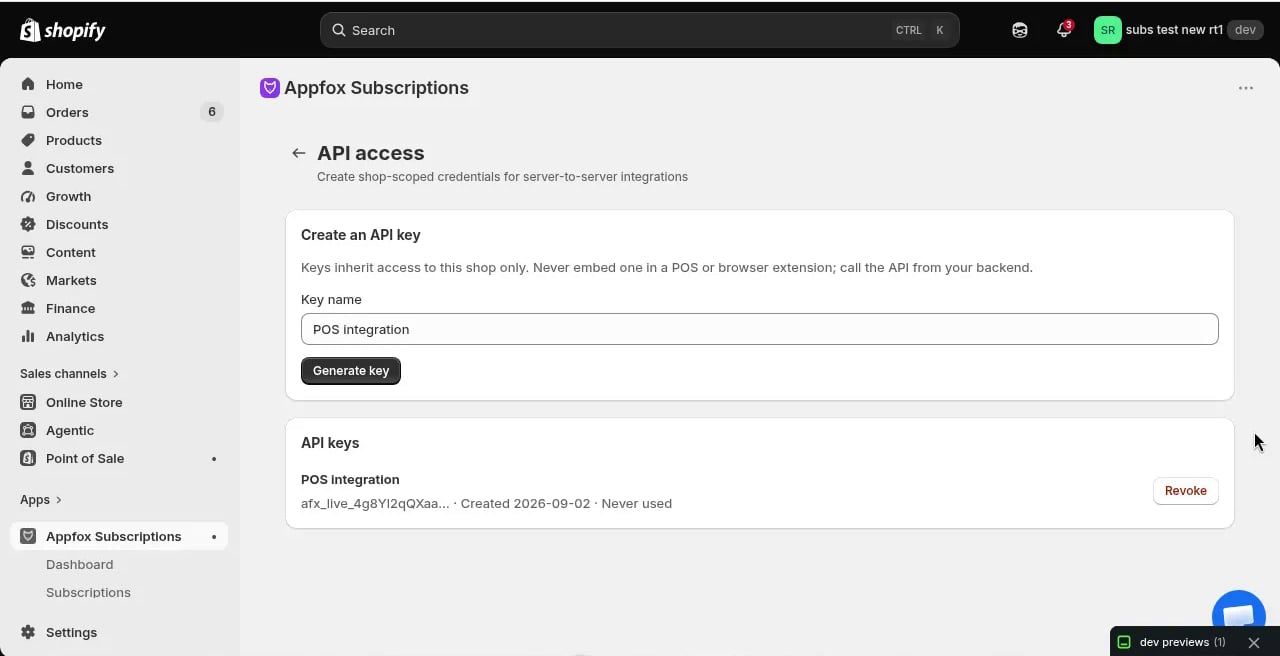 1. Open the Appfox Subscriptions app from your Shopify admin
2. Click **Settings**, then **API**
3. Click **Generate key**
4. Copy the key immediately — it's only shown once
The raw key starts with `afx_live_` and should be stored in a server-side secret manager. Do not put it in:
* Browser bundles or mobile apps
* POS UI extensions
* Source control
* Application logs
* Query parameters or URLs
## Key management
* Each shop can have up to **5 active keys**
* Keys can be revoked immediately from the same API screen
* Only a SHA-256 digest is stored by Appfox
* Keys are permanently scoped to the shop that created them
API access is included for every store while Appfox Subscriptions is [free for now](/subscription/docs/subscription/docs/settings/billing).
## Making authenticated requests
Include your API key as a bearer token in the `Authorization` header:
```bash theme={null}
curl https://subscriptions-app-new.getappfox.com/api/v1/subscription-contracts/123456789/actions \
-X POST \
-H "Authorization: Bearer afx_live_..." \
-H "Content-Type: application/json" \
-d '{"action": "pause", "resumeAt": "2026-10-15T09:00:00Z"}'
```
The same API key works for the [MCP server](/subscription/docs/subscription/docs/api/mcp) when connecting IDEs like Cursor, Claude Code, or VS Code.
## Server-to-server only
This API is designed for backend-to-backend communication. If you're building a POS UI extension or storefront integration, have your client call your own backend, which then calls Appfox with the API key.
## Error responses
Authentication errors return `401 Unauthorized`:
```json theme={null}
{
"error": {
"code": "unauthorized",
"message": "Invalid or revoked API key."
}
}
```
Plan restriction errors return `403 Forbidden`:
```json theme={null}
{
"error": {
"code": "plan_required",
"message": "External API access requires the Enterprise plan."
}
}
```
This documentation is built and hosted on [Mintlify](https://mintlify.com), a developer documentation platform.
1. Open the Appfox Subscriptions app from your Shopify admin
2. Click **Settings**, then **API**
3. Click **Generate key**
4. Copy the key immediately — it's only shown once
The raw key starts with `afx_live_` and should be stored in a server-side secret manager. Do not put it in:
* Browser bundles or mobile apps
* POS UI extensions
* Source control
* Application logs
* Query parameters or URLs
## Key management
* Each shop can have up to **5 active keys**
* Keys can be revoked immediately from the same API screen
* Only a SHA-256 digest is stored by Appfox
* Keys are permanently scoped to the shop that created them
API access is included for every store while Appfox Subscriptions is [free for now](/subscription/docs/subscription/docs/settings/billing).
## Making authenticated requests
Include your API key as a bearer token in the `Authorization` header:
```bash theme={null}
curl https://subscriptions-app-new.getappfox.com/api/v1/subscription-contracts/123456789/actions \
-X POST \
-H "Authorization: Bearer afx_live_..." \
-H "Content-Type: application/json" \
-d '{"action": "pause", "resumeAt": "2026-10-15T09:00:00Z"}'
```
The same API key works for the [MCP server](/subscription/docs/subscription/docs/api/mcp) when connecting IDEs like Cursor, Claude Code, or VS Code.
## Server-to-server only
This API is designed for backend-to-backend communication. If you're building a POS UI extension or storefront integration, have your client call your own backend, which then calls Appfox with the API key.
## Error responses
Authentication errors return `401 Unauthorized`:
```json theme={null}
{
"error": {
"code": "unauthorized",
"message": "Invalid or revoked API key."
}
}
```
Plan restriction errors return `403 Forbidden`:
```json theme={null}
{
"error": {
"code": "plan_required",
"message": "External API access requires the Enterprise plan."
}
}
```
This documentation is built and hosted on [Mintlify](https://mintlify.com), a developer documentation platform.